Ransomware Proof: Build a Data Go-Bag Before You Need One
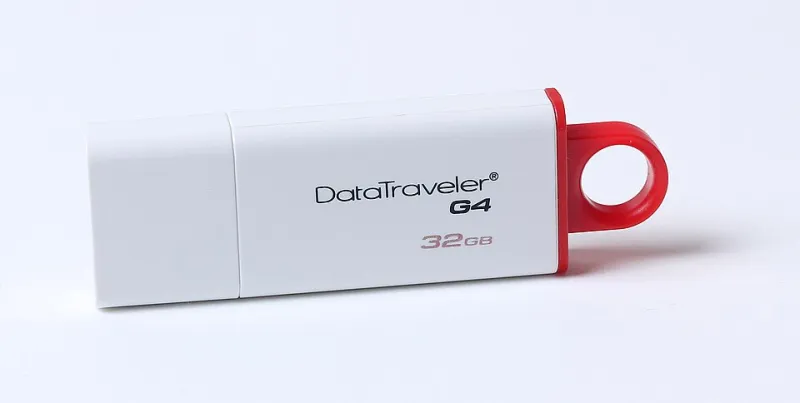
Photo: Dmitry Makeev, CC BY-SA 4.0, via Wikimedia Commons
Picture this: it's 2 a.m., a wildfire evacuation order just hit your county, and your phone is showing one bar of battery and zero bars of signal. You grab the kids, the dog, and the photo album your grandmother left you. What you don't grab — because you can't — is the deed to your house, your insurance policy, your kid's birth certificate, and the tax records the IRS might want next year.
Those files exist somewhere, sure. Probably in a cloud drive you pay $9.99 a month for. But cloud accounts get locked, breached, or simply unreachable when cell towers go down. We've spent years digitizing everything and backing up almost nothing offline.
It's time to fix that. Call it a data go-bag: a small, encrypted archive of your most critical files that lives in a drawer, a safe, or a bug-out bag, and works with or without the internet.
Why Offline Still Matters in an Everything-Is-Online World
The pitch for cloud-only storage has always been convenience, and honestly, it's a good pitch. But convenience has a failure mode, and we keep finding out the hard way.
Ransomware crews have learned that if they encrypt your PC, they'll also hit anything your PC can reach — including synced cloud folders. Plenty of victims have watched their "backup" get encrypted in real time because it was connected the whole time. Meanwhile, cloud outages happen more than any provider's status page would like to admit, and account lockouts (a flagged login, a forgotten password, a hacked recovery email) can freeze you out of your own documents for days or weeks.
An offline copy sidesteps all of it. No connection, no credentials, no attack surface beyond whoever holds the drive.
What Goes in the Go-Bag
Think of it as the paperwork version of a fire drill. You're not archiving your entire digital life — you're grabbing the files you'd need at the worst possible moment:
- Identity documents: passports, driver's licenses, Social Security cards, birth certificates, naturalization papers
- Property and finance: deed or lease, car titles, insurance policies (home, auto, health), recent account statements
- Legal: wills, powers of attorney, medical directives, custody documents
- Medical: vaccination records, prescriptions list, allergy info
- Emergency reference: contact list for family, doctors, insurance agents, and your bank's fraud line — because your phone's contacts app won't help if the phone is dead
- A few irreplaceable photos. Not your entire camera roll. Just the ones that would genuinely break your heart.
Scan everything at 300 DPI or higher with any phone scanning app, and you're most of the way there.
The Build: Under an Hour, Start to Finish
You need three things: a USB flash drive (32GB is plenty — go with a reputable brand, because this is not the place for a $9 mystery stick), optionally a second drive for redundancy, and free encryption software.
Step 1: Gather and organize. Create folders — ID, Home, Medical, Legal, Contacts — and drop your scans in. Fifteen minutes, maybe twenty if your filing cabinet is a crime scene.
Step 2: Encrypt it. On Windows, BitLocker To Go is built in (right-click the drive, choose "Turn on BitLocker"). On a Mac, use Disk Utility to format the drive as encrypted APFS. Cross-platform users should look at VeraCrypt, free and open source, which works everywhere. Use a strong passphrase — and here's the catch — one you will actually remember or have written down somewhere safe at home. An encrypted drive you can't unlock is a paperweight with extra steps.
Step 3: Copy and verify. Drag the folders over, then open a few files from the drive to confirm they're readable. Eject properly. Unencrypted convenience loses to verified security every time.
Step 4: Store it well. A fireproof safe is ideal. A nightstand drawer is acceptable. A second copy in a relative's safe across town is even better — same logic as keeping a spare house key with a neighbor.
Step 5: Put maintenance on the calendar. Once a year, update it. Pick a date you won't forget — the start of daylight saving time, your birthday, tax season. Swap in the new insurance policy, the renewed passport, last year's tax return.
The Objection: "Isn't a Flash Drive a Security Risk?"
Fair question, and we've made the point before that junk-drawer flash drives are a liability. The difference here is intent and encryption. A random thumb drive floating around your house full of unencrypted tax scans is a problem. An encrypted drive, stored deliberately, in a controlled location, is the opposite — it's the only copy of those files that a hacker on the other side of the world can't touch.
The threat models don't overlap. Ransomware can't reach a drive that's unplugged. A breached cloud account can't leak a document that was never uploaded.
One Hour Now, or a Nightmare Later
Nobody builds a data go-bag because it's fun. You build it the way you buy a fire extinguisher: hoping you'll never need it, and deeply glad it's there if you do.
The total cost is one flash drive and an evening hour. The alternative is explaining to an insurance adjuster, from memory, what you owned — or waiting on a government office's processing queue to replace documents you had, once, in a folder somewhere.
The cloud is a great place to work. It's a lousy place to be your only plan. Build the go-bag, stash it, and get back to your weekend.